
Atlantis Marina · For marina groups
Enterprise
Analytics.
Every marina. One clear picture.
Compare occupancy, cash collected and outstanding balances across your group. See where your team needs to focus next.
From $249/month per group. Marina plans billed separately. See pricing.
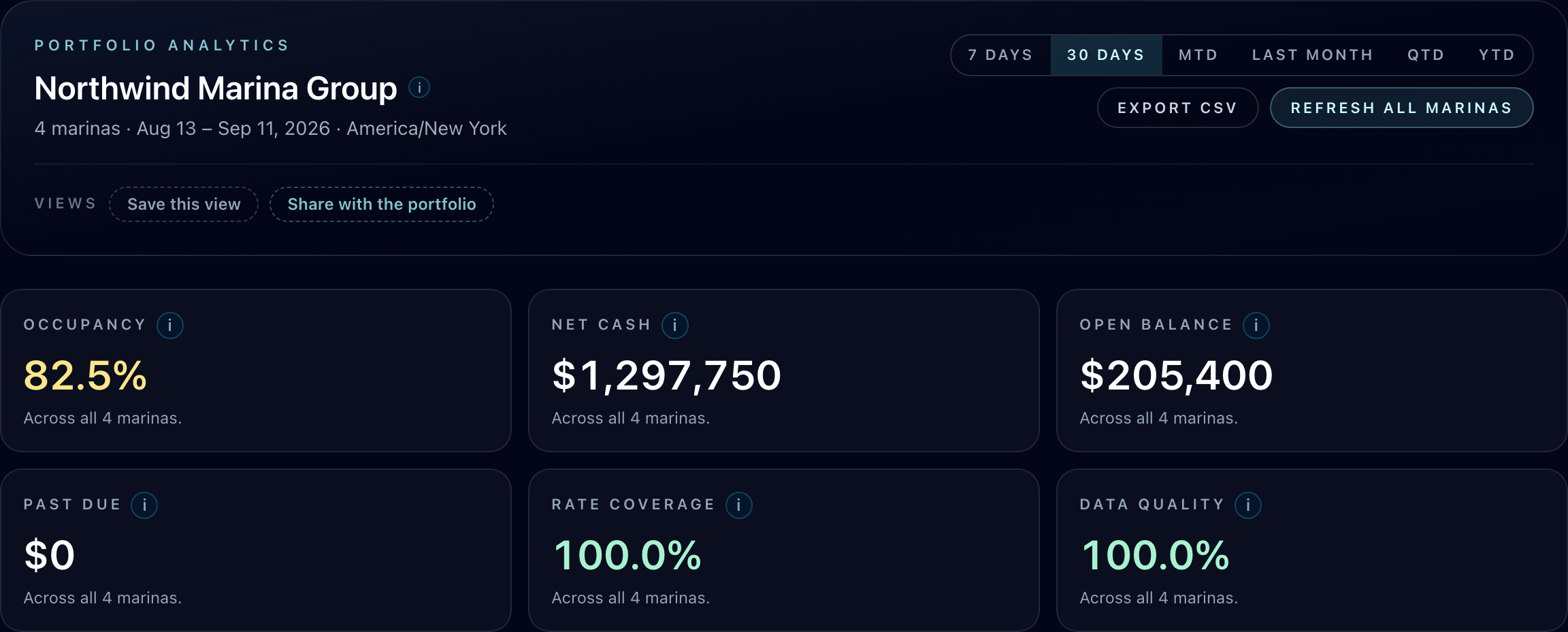
From the group total to the next action
Know where to focus.
- Where is there room to grow?
- Compare occupancy and occupied spaces. See which marinas have capacity and where rate coverage needs attention.
- Where is cash tied up?
- Review collections, net cash, open balances and past-due amounts together, then identify the marinas to follow up with.
- What is behind the total?
- See how many marinas contribute to each figure, with reporting status alongside each location.
Explore Enterprise Analytics
The full workspace.
A quick guided tour.
Start with the complete dashboard, then switch to the comparison view. Explore real Atlantis screens with illustrative marina data. No account needed.
Start with the whole group.
This example shows four reporting marinas in one workspace. Review the reporting period, portfolio totals and marina-by-marina comparison together.
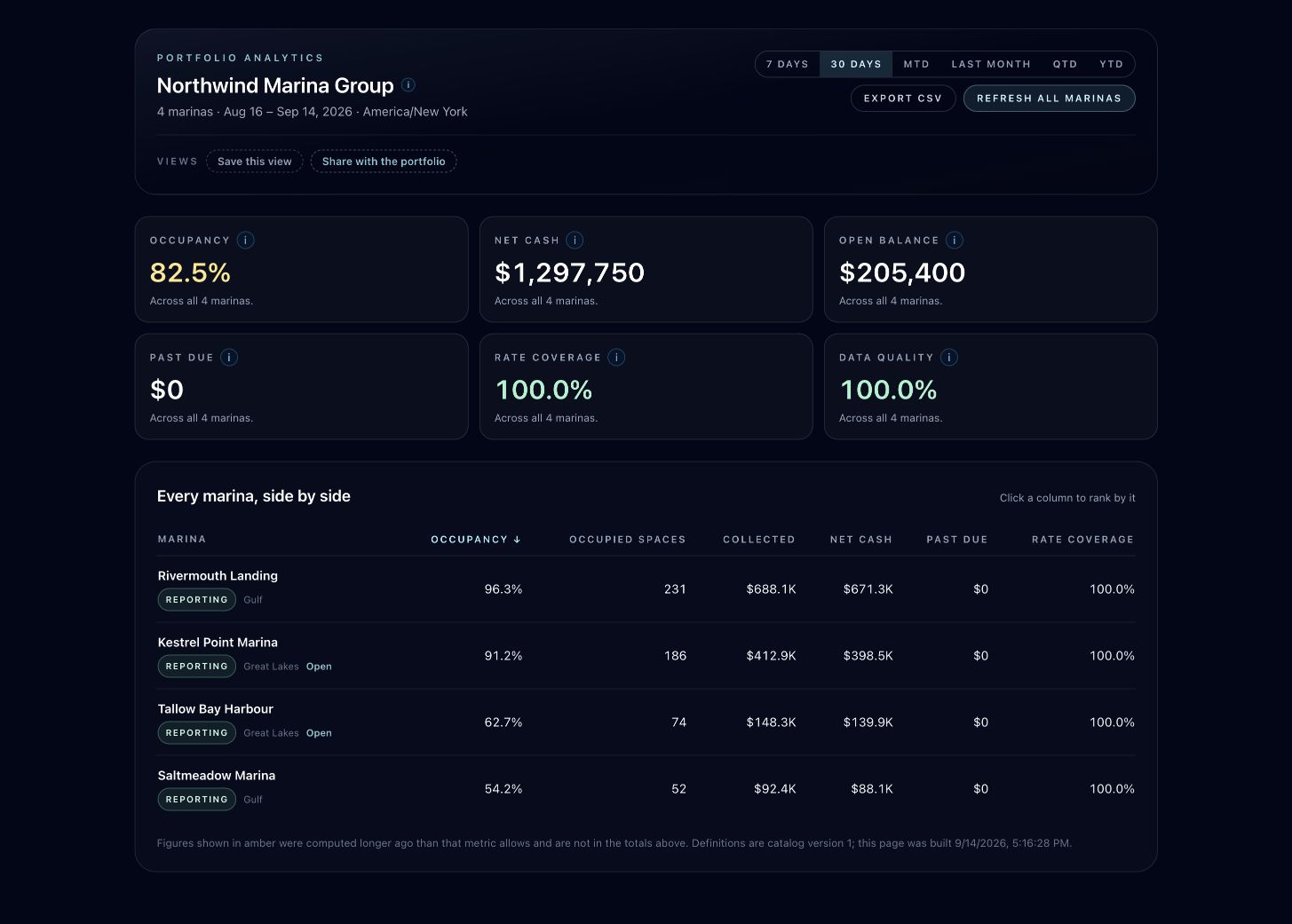
- Occupancy, cash and outstanding balances
- Saved views and CSV export controls
- Individual marinas ranked side by side
Missing data should never look like zero.
Stale or unavailable values are left out of the affected totals and clearly identified. Group rates are recomputed from their underlying counts, so a large marina and a small marina carry the appropriate weight.
For your operating rhythm
A clearer weekly
portfolio review.
Give owners, operators and finance teams the same reporting context, with access matched to their responsibilities.
Open the full dashboard screenshotReturn to the view you use every week.
Save the reporting period and marina ranking. Keep a personal view or share a view with the portfolio when your permissions allow it.
Take the context with the numbers.
Export CSV reports with the period, timezone, metric definitions and reporting coverage attached. Finance can see exactly what each figure represents.
Put reporting on a schedule.
Set up recurring reports for authorized recipients. Give owners and finance teams a consistent way to review the group.
Clear boundaries
One portfolio.
Each marina stays its own.
Each facility keeps its own plan, data and staff. You decide who can see the group’s numbers, export reports and manage reporting.
Portfolio visibility does not grant access to an individual marina. Your dock teams keep working in their own facility workspace.
Explore the marina workspaceStraightforward group pricing
One add-on.
Your whole group.
Priced by the number of marinas you combine. Each facility’s base plan is separate.
Discuss your marina groupAtlantis confirms your portfolio and enables Enterprise Analytics. View marina base plans.
| Marinas in your group | Group add-on |
|---|---|
| Up to 5 marinas | $249/mo |
| 6–15 marinas | $599/mo |
| 16–40 marinas | $1,299/mo |
| 41–100 marinas | $2,499/mo |
| More than 100 marinas | Let’s talk |
The amount above covers the group’s analytics add-on; it is not charged once per marina.
Before you decide
A few useful answers.
Is Enterprise Analytics included in a marina plan?
It is an optional add-on for the group, starting at $249 per month for up to 5 marinas. Each marina keeps its own base subscription. Contact Atlantis to confirm the marinas in your group and enable the add-on.
Can I combine marinas that use different software?
The portfolio dashboard combines data from your participating Atlantis Marina facilities. If some locations use other software, we will review their systems and the move to Atlantis during your consultation.
Does portfolio access give someone access to every marina?
No. Portfolio permissions and facility access are separate. You choose who can view the group, export reports, manage shared views and schedule reports. Opening an individual marina still requires access to that facility.
What happens when a marina has stale or missing data?
The dashboard identifies reporting gaps and shows coverage for each total. Stale or missing values are excluded from the affected totals instead of being counted as zero. You can see which marinas need a refresh or follow-up.
Can our finance team export and receive reports?
Yes. Authorized users can export CSV reports with the reporting window, timezone, metric definitions and coverage. Saved views keep useful comparisons close at hand, and scheduled reports support recurring delivery to authorized recipients.
Your next portfolio review starts here
See what your group
could see together.
Tell us how many marinas you operate and what you need to report. We’ll walk through the dashboard, access controls and pricing with you.
A conversation about your operation. No payment required to request a demo.